Product

The CRM your inbox already filled out.

Warm Vanilla Inbox reads what you already work in. Deals, counterparties, properties and prospects, pulled out of your Outlook and the paperwork attached to it. Zero manual entry.

01 · Capture

Every interaction. Automatically.

Connect Outlook once. Warm Vanilla Inbox reads every email and every attachment, continuously, and keeps them. No manual entry, and nothing sent or drafted on your behalf.

Connect once, capture forever.
A one-time OAuth connection to your work inbox. Warm Vanilla Inbox reads your mail in the background, without touching what's already there. Disconnect anytime.
Every broker, every assistant.
Connect your assistant's mailbox too. If they send the listing agreement out for signature, the executed copy comes back to them, and that document is what creates the deal.
Deleted mail is still your record.
Once an email is read it stays in the record, even after you clear it out of Outlook. If a complaint means producing the full correspondence on a transaction, it's there.
Your inbox stays untouched.
Warm Vanilla Inbox reads. It doesn't reorganize, edit, or move the email you've already received. Your Outlook stays exactly where you left it.
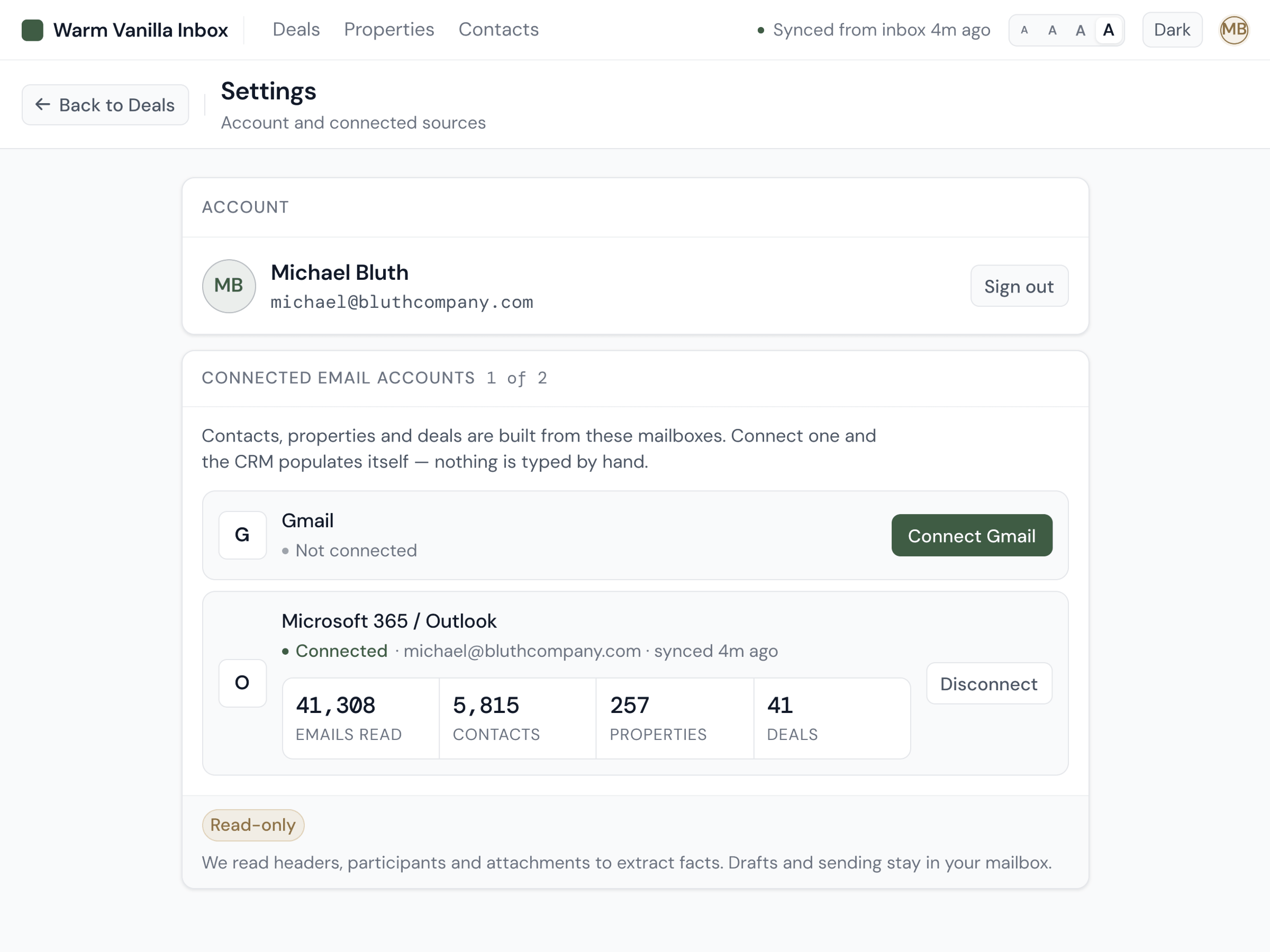
Warm Vanilla Inbox capture: Outlook account connected, email and attachment ingestion running
02 · Extract

Every deal, traced to its signed document.

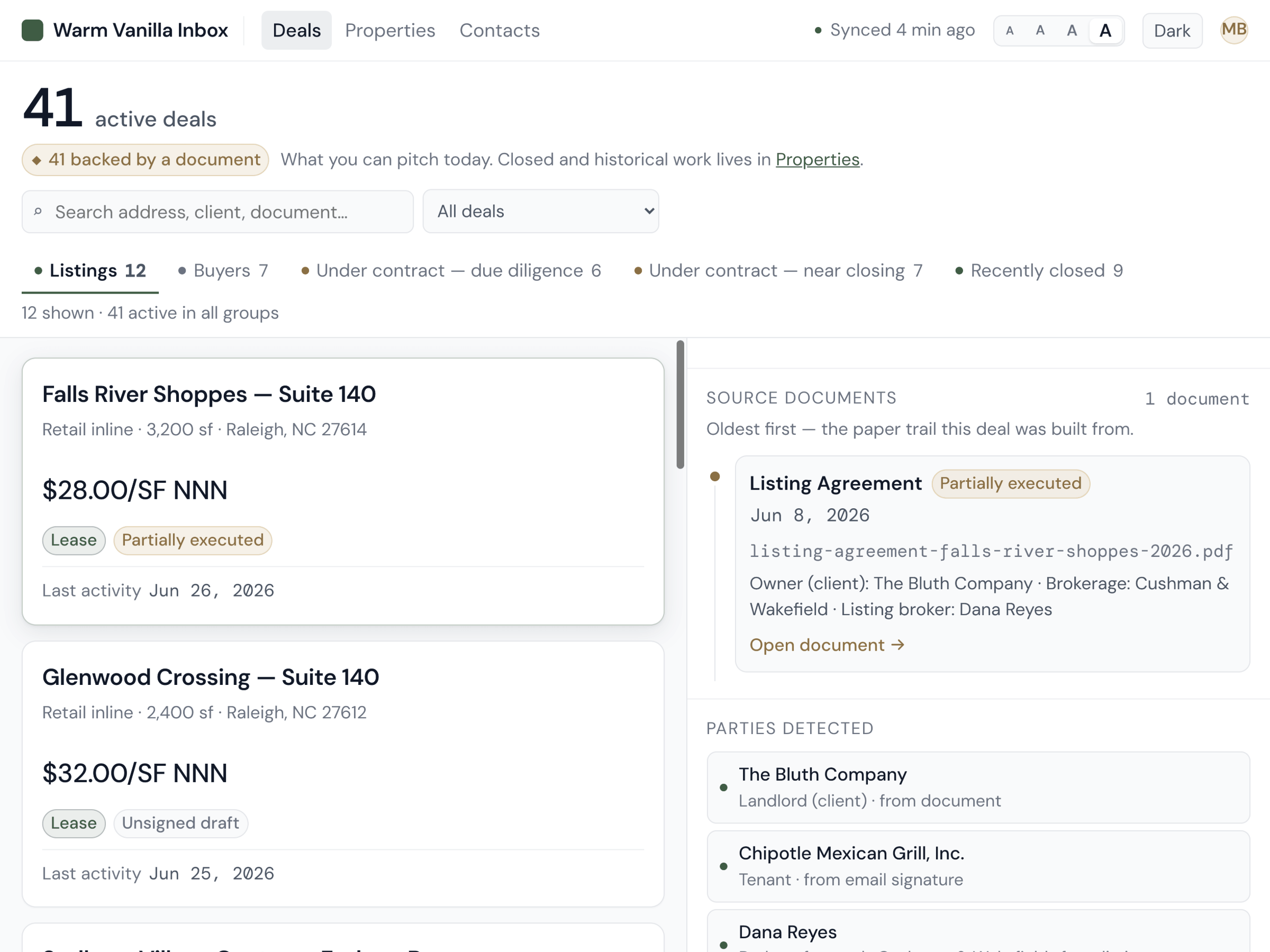
Deals aren't guessed from subject lines. They're created from the executed document that made them real. Contract, listing agreement, lease. If a deal exists in Warm Vanilla Inbox, you can click through to the source.

Deals come from documents.
A signed listing agreement creates a listing deal. An executed contract creates a sale deal. A signed lease creates a lease deal. No document, no deal. No guessing.
Click to see the source.
Every deal in your workspace has a document behind it. Click through to see the exact contract, agreement, or lease it was created from. Full audit trail, always.
Counterparties auto-linked.
The parties named on the document become the counterparties on the deal. Their email addresses, pulled from the signed page and linked to the record automatically.
Properties auto-linked.
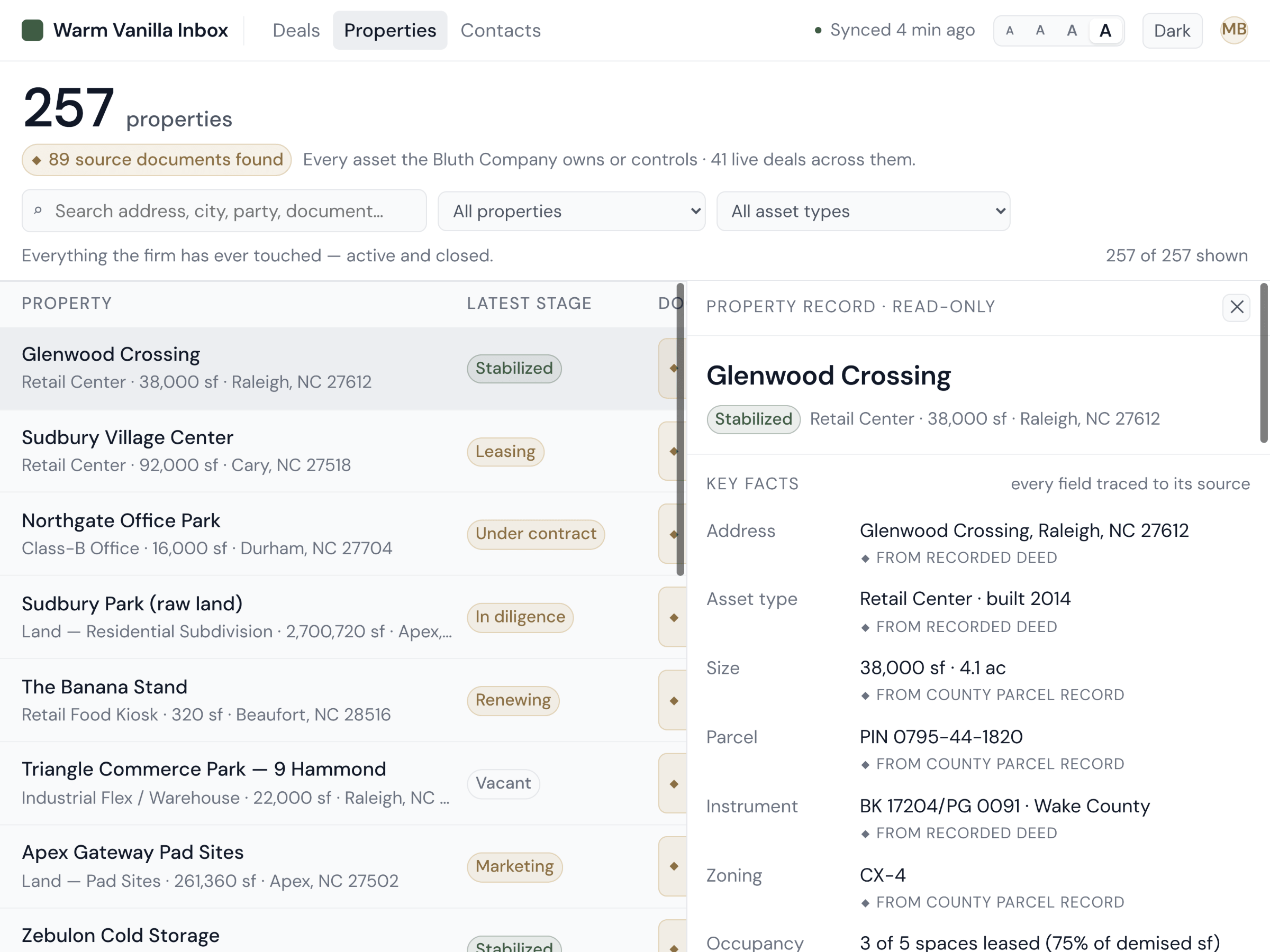
The address on the document becomes the property record. If you've worked that property before, the new deal joins the existing history. If not, a new property is created.
A deal in Warm Vanilla Inbox with a click-through to the executed document that created it
The trust rule

Never invents data. Blanks over guesses.

If Warm Vanilla Inbox isn't sure about a field, it leaves it blank. It won't fill in a purchase price it can't verify. It won't invent a closing date to look complete. Blank is honest. Wrong is dangerous.

03 · Views

Three ways to look at the same data.

Deals, clients, properties. Every entity you care about, three ways to see it. Drill into any panel to see the connections between them. The graph runs in every direction.

The deal panel.
Price, lifecycle stage, counterparties on both sides, timeline of every interaction. The full picture of a single transaction, on one screen.
The client panel.
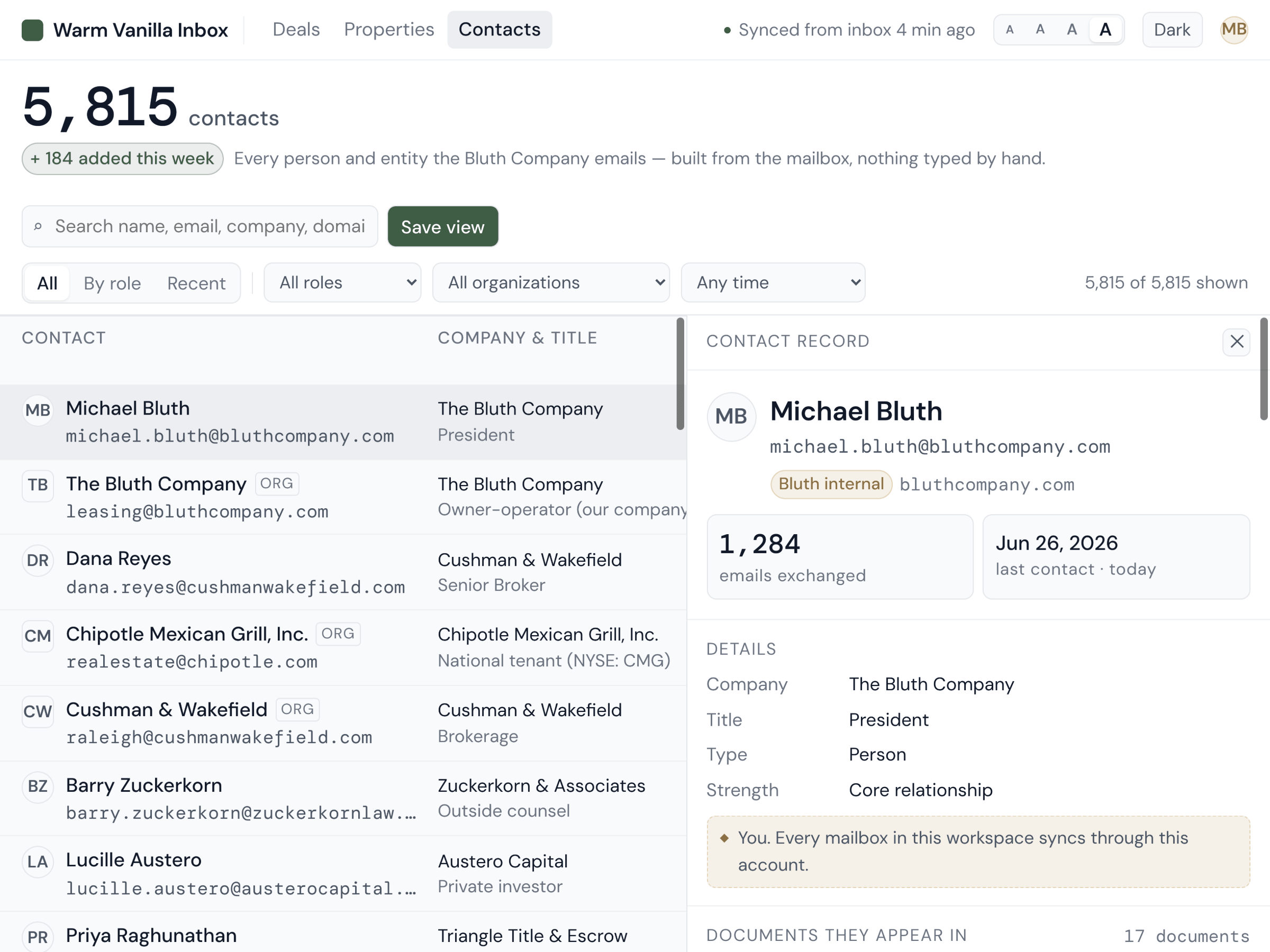
Every deal a client has been on and every property they've touched. The same person across three email addresses resolves to one record, so you stop seeing them as three contacts.
The property panel.
Every deal your firm has worked on this property, in order. The transaction history you've lived, surfaced from your own email trail.
Everything connects.
Click a deal, jump to its property. Click a property, see every counterparty who's touched it. Click a client, see the full history. No dead ends. No lost context.
Warm Vanilla Inbox deal panel view with drill-through to counterparties and properties
04 · Prospects

Everyone who ever asked, still on the list.

One buyer closes. The rest go quiet and you never hear from them again, because nothing kept track. Warm Vanilla Inbox keeps every one of them, from the platforms and from the calls that never touched your inbox.

Platform inquiries become records.
When someone asks about a listing through Crexi, LoopNet, CoStar or Zillow, that email becomes a structured prospect: who they are, which property, when, through which platform, and whether they asked for a flyer, booked a tour, clicked the phone number or just saved it.
Search an address, see everyone.
Type a street address and get every person who ever inquired on that building, with their first and last contact dates. For two owners at one firm, over a single year, that was 485 people.
Their history follows them.
Each prospect carries every property they've shown interest in, their company, their phone number, and whether they're an investor or an owner-operator. One person, one record, however many buildings they've circled.
The call in the car counts too.
Most prospects don't start in an inbox. Press record on your phone, say what happened, and about a minute later it's a prospect record with their name, number, the property, what they need and the follow-up date pulled out of what you said.
Warm Vanilla Inbox prospects view: inquiries captured from listing platforms, with contact history per property
Shipping next

What's coming, close.

Everything above is real and running on a live firm's data today. Here's what's next, so nothing on this page turns out to be a surprise later.

Putting the prospects to work

From a list you can search to a list that calls you.

Every new listing matched against every past inquiry. Today you search an address and find the people. Next, it works the other way: the nineteen who didn’t buy last year’s warehouse surface on their own the day a similar one comes onto your book.
Reminders and tasks from what you said. “Remind me to send the property doc before Friday” becomes an actual task, pulled out of the memo without you opening anything.
Less friction

Fewer steps between saying it and having it.

One tap to approve a memo. Review what the system pulled out of your voice note and turn it into a contact and a prospect with a single tap, instead of checking it field by field.
A nightly refresh. Deals stay current on their own overnight. Nobody runs anything, nobody presses sync.
Asked for, not built

The two things brokers raise first.

Deal-level permissions. Today the record is shared inside your firm’s workspace. Negotiations that shouldn’t be firm-wide need controls we haven’t finished, so if that matters to you, raise it on the call.
Gmail alongside Outlook. Microsoft 365 and Outlook work today. Gmail is on the list and isn’t built, so we won’t pretend otherwise.
For brokerages

See it work on your inbox.

Reading about the product is one thing. Watching your own deals, clients, and properties assemble themselves from the emails you've already sent is another. We'll build it against your real inbox and show you what surfaces.

  • Live walkthrough on your firm's actual email history, not a canned demo
  • 30 minutes with the founder, no SDR and no script
  • Free 6-month backfill so you can see the pipeline before you decide
  • Honest answers on fit, pricing, and timeline
For brokerages of 5+
Book a 30-minute walkthrough.
If your brokerage has at least five brokers and you want to see the product running on your own data, this is the path.
See it on your inbox
Hosted by the founder. No SDR. No script.

Stop digging. Start closing.

We're onboarding brokerages in waves. Tell us about yours.

Book a walkthrough